You choose where it runs. The detection does not change.
Regulated organizations do not all have the same infrastructure requirements, and a security review that stalls on architecture costs months. EzProtect delivers the same scanning layer in our cloud or inside yours, sized to whatever volume your orgs actually move.
A checkbox is not a security layer. Enterprise security reads every file and every link.
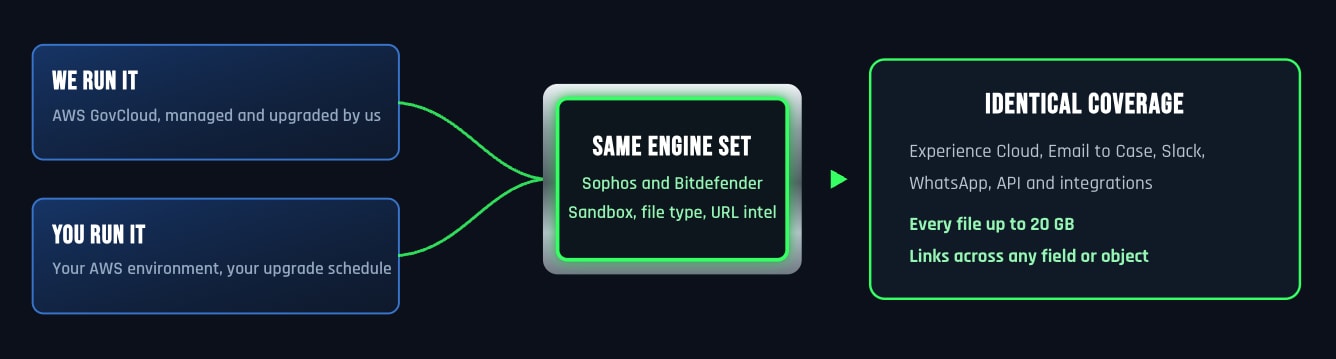
Both options run the same detection. The difference is who owns the infrastructure underneath it.
We run it, and you keep your team out of the infrastructure.
We manage the servers, the scaling, the monitoring, and the upgrades. Your team installs a managed package and starts scanning. New detection layers and engine updates apply automatically, so the protection improves without a project attached to it. This is the route most customers start with.
You run it, and you keep full autonomy.
You deploy into your own AWS environment with complete control over configuration, scaling, and data residency. Run a single EC2 instance or an auto scaling load balanced cluster sized to your file volume. Scanning is unlimited on your own servers and your IT team owns the upgrade schedule. This is what federal agencies and regulated enterprises choose when data residency is contractual rather than preferential.
Scanning at enterprise volume, with no queue behind it.
A security layer that slows uploads gets switched off. These are the capabilities that keep it invisible to the people using your org.
Parallel file processing
Files are scanned concurrently rather than one after another, so a burst of portal uploads does not become a backlog. Verdicts still return in seconds under load.
Elastic scaling
On your own infrastructure, an auto scaling load balanced cluster adds capacity when volume spikes and releases it when the spike passes. In our cloud, we handle that for you.
High availability
Multiple load balanced servers keep scanning running when a single instance fails, which matters because a scanner that goes down either stops your business or waves everything through.
Volume sized to your org
Tiers are set to your actual throughput during scoping rather than sold as a fixed allowance. One current customer runs 4.5 million scans a month.
Containerized and segregated
Scanning runs in isolated containers with network segregation, so a file being detonated for behavioral analysis cannot reach anything that matters.
Native reporting either way
Scan activity, blocked threats, and volume report into native Salesforce dashboards regardless of where the scanning infrastructure lives.
The security you get does not depend on where it runs.
Both deployment models include every layer, every path, and every file size.
The same detection
Sophos and Bitdefender together, true file type inspection, behavioral analysis in an isolated sandbox, and URL scanning across any field or object against live threat intelligence.
The same coverage
Experience Cloud portals, Email to Case, connected Slack and WhatsApp channels, and API and integration paths.
The same limits
Every file up to 20 GB, held until the verdict returns. Salesforce native scanning stops at 100 MB and accepts 10 GB files unscanned.
The same visibility
Scan activity, blocked threats, and volume all report into native Salesforce dashboards, where your admins already work.
The deployment question is really a job security question.
Your security team, auditors, and contracting officer will examine where data sits, who can see it, and how long it’s kept. Choosing a vendor that can’t answer these plainly is how a project stalls for two quarters. EzProtect answers all three in writing, on any deployment model.
Where the data sits
United States (AWS standard or GovCloud), isolated deployment, or entirely inside your own environment.
Who can see it
The integration user sees scan activity only — reaches zero customer objects.
How long it is kept
Files are encrypted in transit and deleted immediately after scanning — zero data retention.
"We do not take chances on any file a customer uploads for a claim, or any link that arrives in a teammate's inbox. Peace of mind comes with EzProtect and the coverage they keep adding."
— VP of Engineering, Healthcare Provider
You reach a technical expert on the first call.
Security incidents do not wait in a ticket queue. Every EzProtect customer gets a named technical contact with full contact details, and that contact understands the product because they work on it. We keep the line open rather than closing the case.
Know exactly where your data sits before your next audit.
Thirty minutes with a Salesforce security specialist. We’ll match the model to your requirements.