Every file. Every link. Scanned before it enters your orgs.
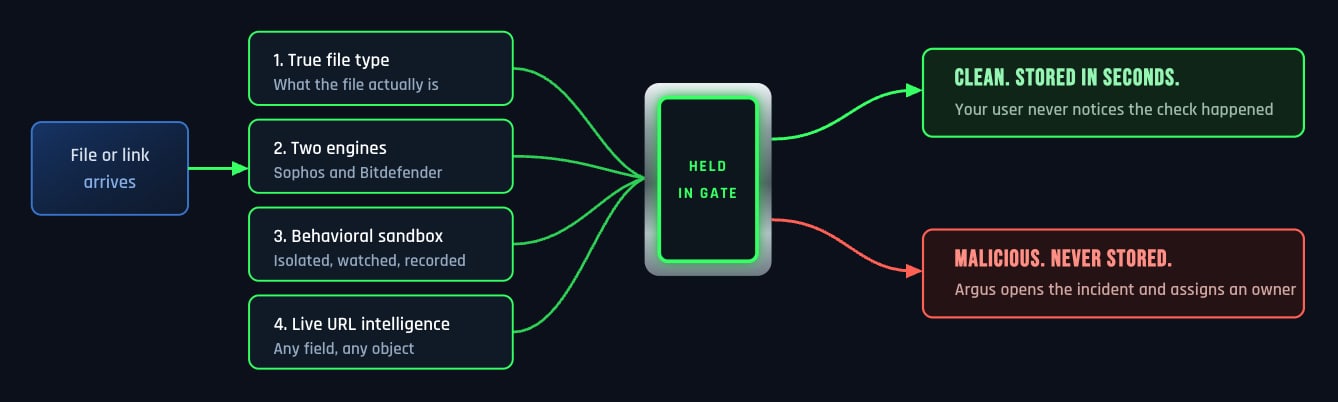
EzProtect is a Salesforce native security layer built by Salesforce certified architects. Signature detection, behavioral analysis in an isolated sandbox, true file type inspection, and live URL threat intelligence all run before anything is stored in your org.
That matters because Salesforce does not disclose how native scanning decides what is malicious. You can test every layer of ours in your own org.
The file is held in the gate the entire time. It is never written to your orgs and then withdrawn.
We identify what a file actually is
An executable renamed to .png clears extension and MIME controls everywhere else. EzProtect reads the contents with true file type detection and identifies the file for what it is.
We run two engines, not one
Sophos and Bitdefender both examine every file. Two independent detection engines catch what either one alone can miss.
We make unknown files prove themselves
Anything without a known signature runs in an isolated sandbox and gets watched. That is how a threat with no signature yet is stopped before it is stored.
We scan links the same way we scan files
EzProtect checks URLs across any field or object against live threat intelligence, then rewrites them so the check runs again at the moment someone clicks. Native scanning never inspects a link.
We cover every way into your orgs, not just one.
Salesforce documentation scopes native scanning to uploads and downloads in Salesforce Files. Threats arrive through more doors than that.
Every path into your orgs runs through the same gate. Nothing is stored until the verdict comes back clean.
Experience Cloud portals
Customers, partners, applicants, and members upload files without an employee ever touching them. This is the door that opens to the public internet.
Email to Case
Attachments and links arrive from any address that can reach your queue, and your agents open them because that is the job.
Connected channels
Slack and WhatsApp conversations wired into your orgs carry files and links the same way any other path does.
API and integrations
The route native scanning permits first and inspects afterward. EzProtect treats it exactly like every other route in.
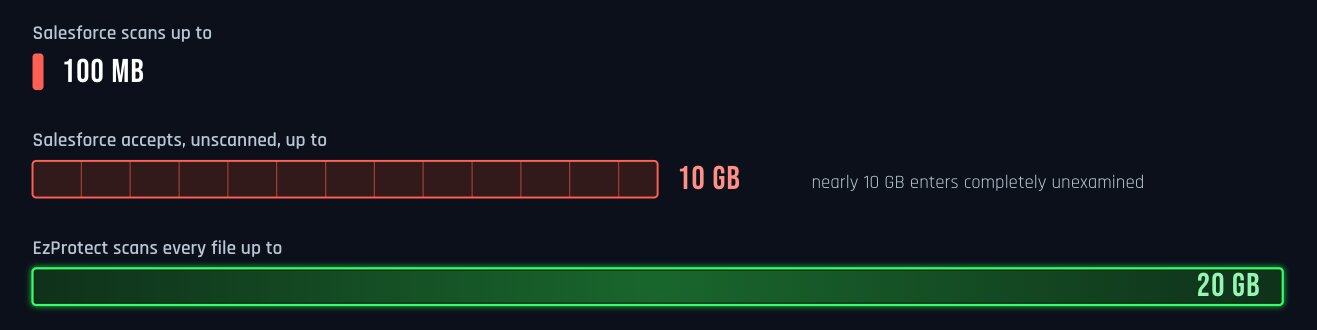
Salesforce accepts 10 GB and inspects 100 MB.
We inspect 20 GB.
Salesforce documentation confirms that files above 100 MB are neither scanned nor blocked from upload, preview, or download, while the platform itself accepts uploads as large as 10 GB. That is a band of nearly 10 GB where a file enters your orgs completely unexamined. EzProtect scans every file up to 20 GB, which covers the platform ceiling twice over.
Sources: Salesforce Help, Malware Scanning for Salesforce Files, and the Salesforce Lightning Component Library.
Your attacker runs the same scanner you do.
Native scanning is free and identical in every Salesforce org. Someone targeting you can run the same scanner you run, confirm a file slips through, and only then aim it at you. The limits are public, so a file built to clear them clears them everywhere.
Nothing moves until scanning proves it is safe.
Salesforce blocks interface uploads but allows API uploads to land and scans them afterward. It also allows the first download of a pre-existing file to complete before it examines it. EzProtect holds every file and every link until the verdict returns, and the verdict takes seconds. Your users do not notice. Your attacker does.
You own the org, so you already know the two questions that matter.
Will this break anything?
It will not. EzProtect installs as a managed package. Scanning happens before storage and returns in seconds, so your Experience Cloud forms behave the way they did yesterday.
How much of this becomes my job?
Very little. Scan activity and blocked threats report into native Salesforce dashboards. Alerts route to the people who should get them. When a real response is needed, Argus assigns it and keeps the record.
"For us, a single miss is not an option. EzProtect scans up to 4.5 million files a month across our Salesforce environment, and it gives us the confidence of knowing our data is protected."
— Director of IT, Federal Agency
Built for organizations that get audited.
EzProtect scans files with zero data retention — encrypted in transit, deleted immediately after scanning. The integration user sees scan activity only and reaches zero customer objects. This architecture makes it impossible to create a data residency issue, addressing GDPR and regulatory frameworks globally.
Today, EzProtect scans 4.5 million files monthly for a highly regulated federal agency.
For teams running other systems alongside Salesforce, the EzProtect On-Demand Scanner API extends the same engine to any application with a REST API. Salesforce remains where our expertise lives.
Making Salesforce the Safest Place for Enterprise Data
In thirty minutes, a Salesforce security specialist runs the trojan test in your own environment and shows you exactly where the gaps sit.