Share
Every bag at the world’s busiest airports gets screened before it boards, and every file and link entering a Salesforce org deserves the same checkpoint.
Atlanta’s Hartsfield-Jackson airport moved 106.3 million passengers in 2025, more than any other airport on earth. Airports worldwide handled an estimated 9.8 billion travelers that year, and Airports Council International forecasts 10.2 billion in 2026.
Almost every one of those travelers passes through a checkpoint. Bags go through an X-ray, boarding passes are scanned at security and again at the gate, and anything the screeners cannot identify is pulled aside for a closer look. Nobody assumes a bag is safe because it looks ordinary. Salesforce file scanning should work the same way.
A Salesforce org runs on the same kind of traffic. Customers upload documents through portals, partners email attachments into service queues, integrations write files through the API, and AI agents read all of it to decide what to do next. This guide walks through the risks that start at each entrance, how Salesforce native scanning handles them today, how layered file and link screening works, and what auditors expect to see.
A file or link becomes dangerous the moment someone trusts it
A malicious document stored in a record does its damage when someone or something acts on it. A service agent opens an attachment, a customer downloads a file from a portal, an employee clicks a link in a case, or an AI agent reads a document and passes its contents along. In each case, Salesforce works like a transit hub that carries a threat from the person who sent it to the person or system that trusts it.
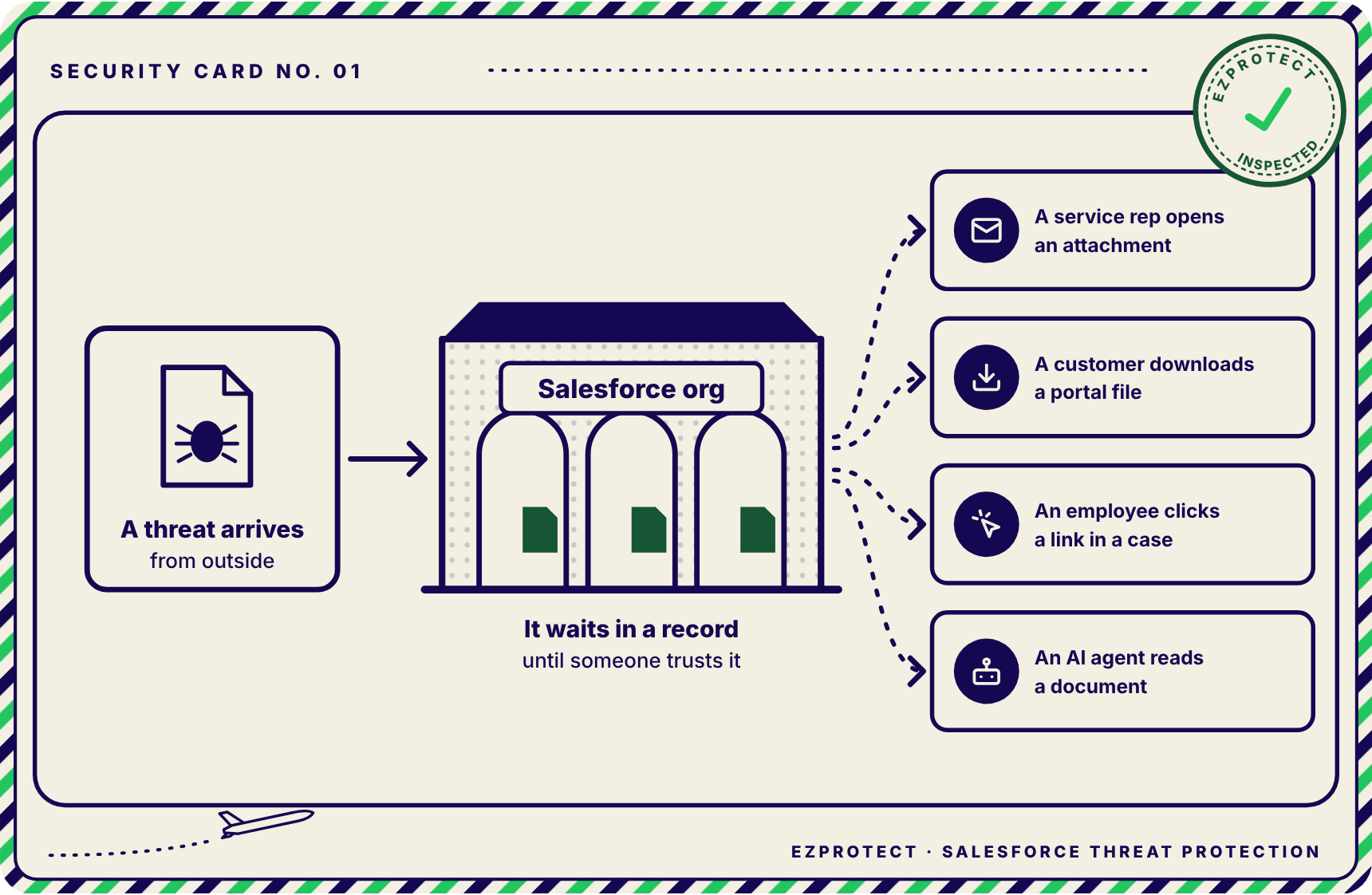
The 2026 Verizon Data Breach Investigations Report shows why that trust matters. It found that 48% of breaches involved a third party, up from 30% the year before, that people contributed to 62% of breaches, and that ransomware appeared in 48% of the breaches it analyzed. A Salesforce org sits exactly where third parties and people meet.
Four risks that start at an unscreened entrance
Each of these risks begins before anyone opens a file or clicks a link.
Malware reaches employees and customers.
A disguised file uploaded once can be downloaded by every user and customer who opens that record.
Credential phishing captures Salesforce logins.
A link stored in a case or lead can send an employee to a fake sign-in page that opens a path to customer data.
AI agents act on untrusted content.
Agents read records and files at machine speed, so poisoned content can steer what they retrieve and where they send it.
Compliance gaps surface during an audit.
Frameworks expect protection at system entry points, and an unscreened entrance is difficult to defend with evidence.
Phishing has moved from the suitcase to the boarding pass
For years, the classic email threat was a malicious attachment, the equivalent of a dangerous object hidden in a suitcase. Attackers have since moved much of their effort toward links, which behave more like a forged boarding pass. A forged pass does not need to hide anything, because it only needs to look valid long enough to send someone through the wrong door.
The 2026 numbers show the shift. The Anti-Phishing Working Group counted 971,181 unique phishing sites in the first quarter of 2026, a 13.8% rise over the previous quarter, and SaaS and webmail services were the second most targeted sector. Microsoft’s data for the same quarter points the same way. Microsoft detected 8.3 billion email phishing attacks, and by March credential theft made up 94% of payload-based attacks while attachment-based malware fell to 5% to 6%. QR code phishing grew 146% over the quarter.
Attachments still matter, because they increasingly carry links. Barracuda’s 2026 Email Threats Report found that HTML files made up about two-thirds of malicious attachments and that 70% of malicious PDFs contained QR codes. It also found that 90% of high-volume phishing campaigns ran on phishing-as-a-service kits.
Each technique works in a specific way. An HTML attachment can render a convincing sign-in page inside the browser, so there is no website for a filter to block. A QR code moves the click from a protected laptop to a personal phone. A checkpoint that looks only for executable malware will wave all of it through. For a deeper look at link-based threats inside Salesforce, read Salesforce Phishing: The URLs Native Scanning Never Blocks.
Speed raises the stakes once something gets through. Mandiant’s M-Trends 2026 found that the median hand-off from initial access to a second threat group fell to 22 seconds, while the global median dwell time rose to 14 days.
Five entrances bring files and links into a Salesforce org
Security reviews for Salesforce usually start with users, permissions, and connected apps. Content, however, arrives through entrances that often belong to different teams, and each one carries its own risk.

| Entrance | Airport equivalent | Main risk |
|---|---|---|
| Experience Cloud portals | The public front entrance | Anonymous uploads that reach internal users and customers |
| Email-to-Case | The mail room | Attachments and links from any sender, opened by agents |
| API uploads and integrations | The service gate | Files from a compromised partner system with no human watching |
| Slack and WhatsApp channels | Transfer passengers | Content screened, or not, on another platform |
| Links in any field | Boarding passes | Destinations that change after the link is shared |
Experience Cloud portals
Experience Cloud opens onto the public sidewalk. Salesforce’s file upload documentation notes that guest users cannot upload files by default, but an org can enable the setting, and Experience Builder sites accept files up to 500 MB on a custom domain. Anyone on the internet can approach this door. Configuration matters here as much as scanning, and EzProtect’s seven actions to secure Experience Cloud cover guest access and secure design.
Email-to-Case
Email-to-Case turns inbound email into service cases, so any address that can reach the queue can deliver attachments and links into Salesforce. Service agents open those messages because that is their job, and invoice, signature, and voicemail lures look like ordinary requests. Airports screen mail and cargo before it goes into the hold, and a service queue is a mail room with direct access to customer data.
API uploads and integrations
Integrations write files into Salesforce through the API, much like catering trucks reaching the aircraft through the service gate. Real airports screen those deliveries too. Integrations are often treated as internal, but the Verizon findings on third-party involvement show how often one partner’s compromise becomes someone else’s breach.
Slack and WhatsApp channels
Connected chat channels bring files and links into Salesforce from platforms with their own security models. Many airports re-screen arriving transfer passengers because they cannot vouch for every checkpoint upstream, and content from a connected channel deserves the same caution.
Links in any field
URLs can live in case descriptions, lead notes, Chatter posts, and custom fields. An attacker can share a link that points to a harmless page when it is first checked and redirect it to a phishing site days later. A link that was safe when it entered may not be safe when someone clicks it.
Salesforce native scanning is a first layer with documented limits
Salesforce now provides malware scanning for Salesforce Files, and it is a welcome first layer. Knowing exactly what Salesforce documents is what lets a team decide what each entrance still needs.
| Situation | What Salesforce documents |
|---|---|
| Upload through the user interface | A malicious file is blocked (Salesforce Help) |
| Upload through the API | The file is scanned asynchronously, after it arrives (Salesforce Help) |
| Files already in the org | Most are scanned when downloaded (Salesforce Help) |
| Files larger than 100 MB | Marked with a Skipped scan status (ContentDocument reference) |
| Detection threshold | Flags only files with a high probability of being malicious, and Salesforce recommends a scanning partner for more stringent needs |
| Links in records and emails | The documentation describes Salesforce Files and does not describe URL inspection |
The rehearsal scenario
Salesforce lists Developer Edition among the editions where Salesforce native scanning is available. That means an attacker can practice against the same checkpoint every customer runs, the way someone might buy an airport’s exact X-ray model and test bags at home until one clears. In EzProtect’s side-by-side test, a trojan disguised as a .png image cleared Salesforce native scanning, and EzProtect blocked it.
For more detail on these documented gaps, read Salesforce Malware Scanning: Why One Layer Is Not Enough.
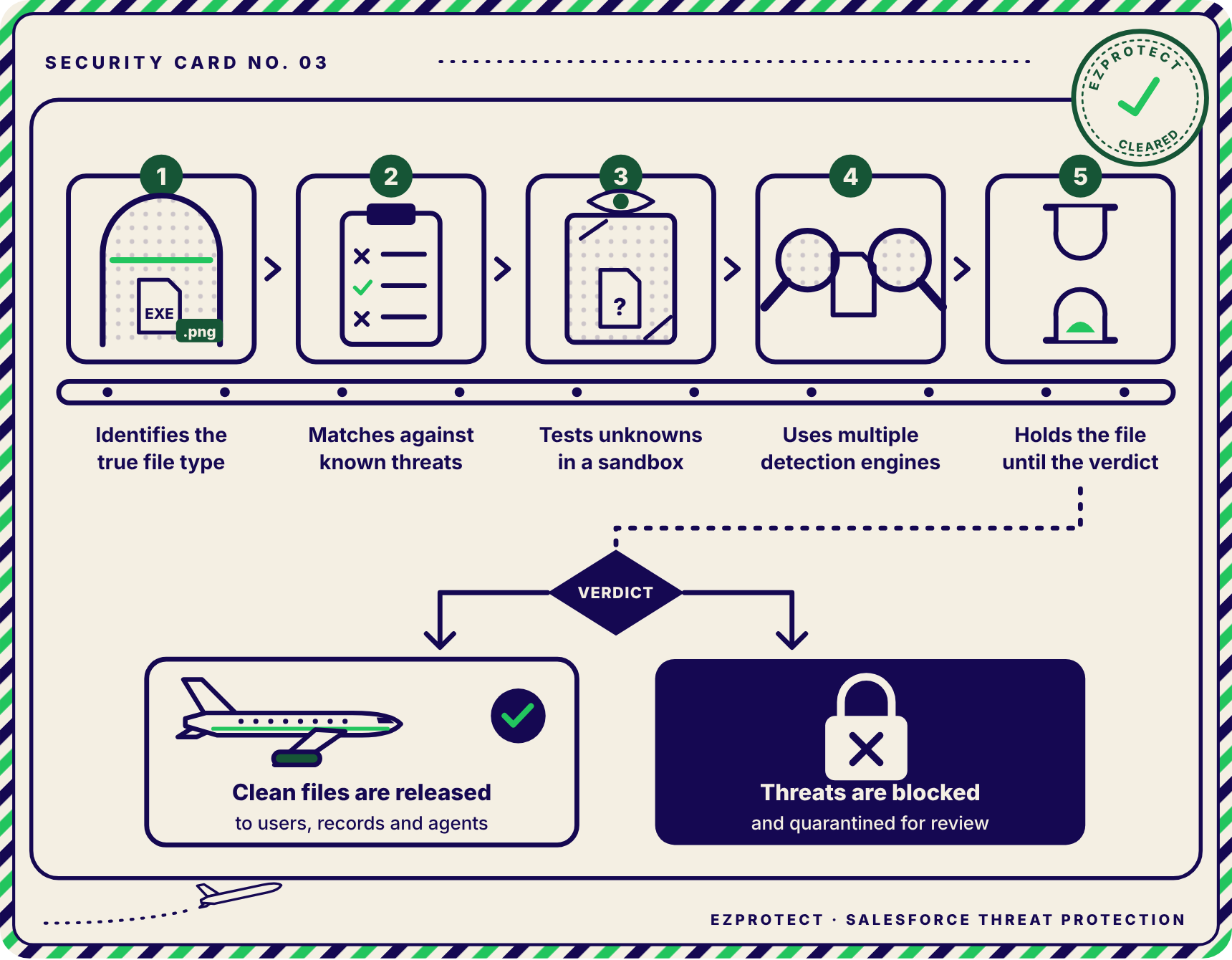
Modern file scanning layers several checks before anything is released
A well-run airport layers several screening methods, and each one catches what the others miss. Salesforce file scanning follows the same principle.
True file type detection
An X-ray shows what is inside a bag regardless of the name tag. Every file format begins with a recognizable pattern in its first bytes, often called magic bytes, and true file type detection reads those bytes instead of trusting the extension. An executable renamed invoice.pdf or photo.png is identified as what it actually is. EzProtect’s guide to high-risk file types and how to block users from accessing them in Salesforce explains which formats attackers favor.
Signature and hash matching
Screeners keep a watchlist of items they already know are dangerous. Signature engines and hash reputation services compare a file’s fingerprint and contents against databases of known malware, which catches a large share of threats almost instantly. A watchlist only recognizes what it has already seen, though.
Sandbox analysis
When an X-ray shows something unfamiliar, the bag goes to secondary screening. Sandbox analysis opens a file with no known signature in an isolated environment and watches it. If it tries to drop other programs, contact a remote server, or change system settings, that behavior reveals its intent.
Multiple detection engines
Airports pair X-rays with explosive trace detection because each method sees something the other cannot. Multiple independent detection engines do the same for files, since different vendors maintain different signatures and heuristics.
Holding files until the verdict
A checked bag does not go into the hold until screening is complete. When a file is held until its verdict returns, nobody can download it while it is still unknown. When a file is accepted first and scanned later, there is a window in which users, integrations, or agents can reach it.
Checking links at entry and at click
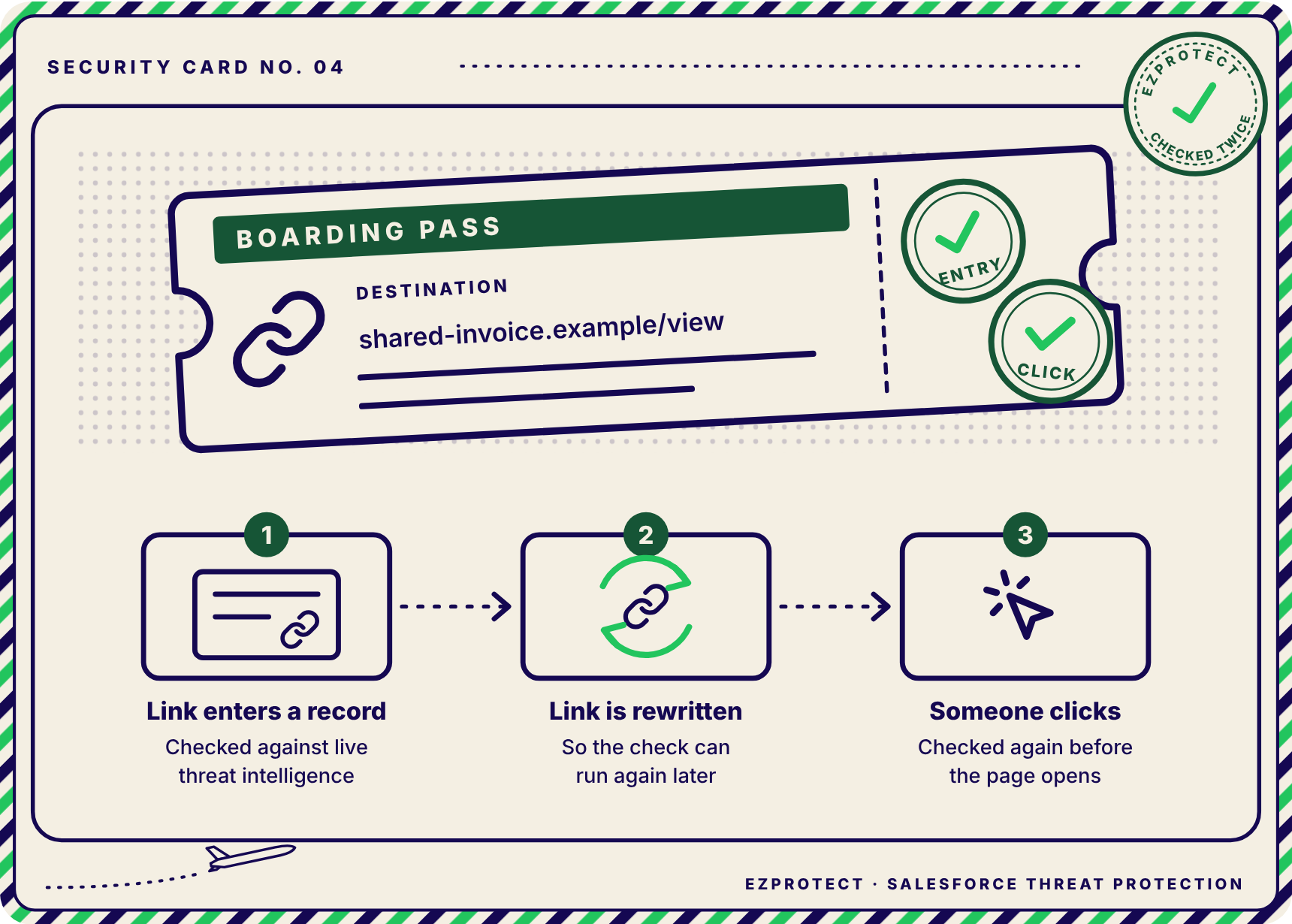
Airports check a boarding pass at security and again at the gate. Link protection checks a URL against live threat intelligence when it enters the org, then rewrites it so the check runs again at the moment someone clicks. The second check catches links that turned malicious after they arrived.
Keeping the scan record
Every checkpoint keeps records of what was screened and what was stopped. That record shows what arrived, which entrance it came through, what the verdict was, and what happened next. EzProtect explains why that evidence matters in The Evidence Gap Between Incident Closure and Audit Readiness.
Agentforce reads whatever the entrances let through
Automated e-gates move travelers through an airport without a person checking each document, and they depend on everything upstream having been screened. Agentforce brings the same dynamic to Salesforce. Agents retrieve records, read fields, and can be grounded in uploaded files through Agentforce data libraries.
The central risk is prompt injection. A language model processes instructions and data in the same stream of text, so content with hidden instructions can redirect what an agent does.
The lead form scenario
In April 2026, Capsule Security demonstrated that instructions hidden in a public lead form could lead an agent to retrieve CRM lead data and email it to an outside party. Salesforce remediated the scenario and described the exfiltration path as configuration-specific.
In September 2026, Zenity Labs disclosed a chain in which a poisoned Web-to-Lead submission caused an agent to embed CRM data in an image link that leaked to an attacker’s domain. Salesforce fixed all three issues Zenity reported by September 21.
It is worth being precise about what scanning can and cannot do here. A malware scanner will not detect a prompt injection written as plain text in a form field, and that risk calls for agent-level controls such as instruction isolation, tool restrictions, Trusted URLs, and human approval for sensitive actions. Files and links are still part of the untrusted content agents consume, so a malicious document or phishing link that reaches an agent began at an unscreened entrance. EzProtect maps this broader shift in Salesforce Built Four Connected Layers. Attackers Are Already Inside One of Them.
Auditors ask which entrances are covered, not whether scanning exists
Aviation regulators ask an airport which entrances its checkpoints cover, what happens to bags it cannot screen, and where the records are. Auditors approach data security the same way, and several frameworks speak directly to malicious content.
| Framework | What it expects |
|---|---|
| NIST SP 800-171 Rev. 3 and CMMC | Malicious code protection at system entry and exit points, including real-time scans of files from external sources and the ability to block or quarantine |
| HIPAA Security Rule | Procedures for guarding against, detecting, and reporting malicious software |
| PCI DSS v4 | Requirement 5.4.1: processes and automated mechanisms that detect and protect personnel against phishing |
| GDPR Article 32 | Security measures appropriate to the risk of processing |
None of these frameworks names Salesforce, and all of them apply to the data inside it. An auditor may ask how a 150 MB portal upload was inspected, how an API upload was handled before its verdict, or how a link in an Email-to-Case message was checked. With the global average cost of a data breach at $4.99 million in 2026, those answers carry real financial weight.
EzProtect screens every entrance before content reaches users or agents
EzProtect brings Salesforce file scanning and link protection to every entrance into a Salesforce org. Each layer of the checkpoint described above maps to a specific capability.
How EzProtect runs the checkpoint
EzProtect reads what every file really is.
True file type detection catches a renamed executable regardless of its extension.
Multiple engines and a sandbox examine every file.
Detection is powered by Sophos and Bitdefender, and files without a known signature are analyzed in an isolated sandbox.
Every file waits for its verdict.
That includes files that arrive through the API, and the verdict takes seconds.
Links are checked at entry and again at click.
EzProtect checks links in any field or object against live threat intelligence and rewrites them so the check runs again when someone clicks.
Every entrance is covered.
Coverage spans Experience Cloud, Email-to-Case, the API, and connected Slack and WhatsApp channels, with files scanned up to 20 GB.
Built for organizations that get audited
EzProtect scans with zero data retention, so files are encrypted in transit and deleted immediately after scanning. Its integration user sees scan activity only.
The EzProtect offering is ISO 27001 audited, and EzProtect renewed its ISO/IEC 27001:2022 certification in 2026. A highly regulated federal agency relies on EzProtect to scan 4.5 million files a month, according to the EzProtect platform overview.
When a threat is confirmed, EzProtect hands the event to Argus. Argus owns the response through the NIST SP 800-61 Revision 3 lifecycle and produces an audit-ready, immutable, role-attributed, timestamped record.
Treat Salesforce file scanning as airport security, not a checkbox
Before the next audit or the next Agentforce rollout, every Salesforce team should be able to answer four questions about the content entering its org.
Four questions for every Salesforce team
Which entrances bring files and links into your org, and who owns each one?
Is every file held until its verdict returns, including API uploads and files over 100 MB?
Are links checked when they enter and again when someone clicks?
Could you show an auditor a record of what was screened and what was stopped?
Book a demo
Map every entrance into your Salesforce org in thirty minutes
A Salesforce security specialist runs the trojan test in your own environment, maps each entrance into your org, and shows you which gates are screened today and which are not.
EzProtect is backed by a 30-day money-back guarantee.
Share
Did you love this blog and wish there could be more?
It is our goal to keep you informed about everything you need to know about Salesforce security to keep your Salesforce data and company safe and secure by providing you with the highest quality of original content.
If this sounds good to you, then sign-up below to be one of the first to know when the next super awesome Salesforce security blog has been released.